

Data model
Evolve defines its own GraphQL data model that is independent of any backing SAAS service. This is a deliberate design choice: by owning the data model, Evolve can integrate any commerce engine, CMS, or search backend behind the same schema. Clients consume a single, consistent API regardless of which vendors are running underneath.
Vendor independence
Section titled “Vendor independence”Each SAAS backend has its own data model (commercetools has ProductProjection,
Contentful has Entry, Algolia has its own hit format). Evolve does
not expose these directly. Instead, each domain service
maps vendor-specific data into Evolve’s own GraphQL types. This means:
- Swapping vendors does not change the API. Replacing your CMS or search engine requires a new service implementation, not frontend changes.
- Combining vendors is straightforward. A single query can return product data from the commerce engine and content from the CMS, merged by GraphQL Federation.
- Custom data models are yours to define. You design the schema that fits your business, not the one your vendor prescribes.
Schema.org alignment
Section titled “Schema.org alignment”Evolve’s data model follows schema.org conventions where applicable. Schema.org provides a shared vocabulary for structured data on the web, and aligning with it gives practical benefits:
- Familiar naming for developers (e.g.,
Product,Offer,Brand) - Easier mapping to structured data for SEO (JSON-LD)
- A well-documented reference for what fields mean
This is not a strict implementation of schema.org; the data model is shaped for e-commerce use cases and GraphQL conventions. But where schema.org provides a sensible name or structure, Evolve follows it.
Key types
Section titled “Key types”The data model spans all domain services. Here are the central types across the main domains:
Products and catalog
Section titled “Products and catalog”type Product { name: String! slug: String! brand: String meta: PageMeta breadcrumbs: [Breadcrumb!] variant(sku: String): ProductVariant variants: [ProductVariant!]!}
type ProductVariant { sku: String! name: String description: String price: ProductPrice availability: ProductAvailability images: [ProductImage!] attributes: [ProductAttribute!]}
type ProductCategory { name: String! slug: String! children: [ProductCategory!] parent: ProductCategory}Cart and checkout
Section titled “Cart and checkout”type Cart { lineItems: [CartLineItem!]! totalPrice: Money! shippingAddress: Address billingAddress: Address availableShippingMethods: [ShippingMethod!] availablePaymentMethods: [PaymentMethod!] discountCodes: [DiscountCode!]}Customer and account
Section titled “Customer and account”type Customer { email: EmailAddress! givenName: String familyName: String addresses: AddressConnection! businessUnits: [BusinessUnit!]}Orders
Section titled “Orders”type Order { orderNumber: String! status: OrderStatus! lineItems: [OrderLineItem!]! totalPrice: Money! createdAt: DateTime!}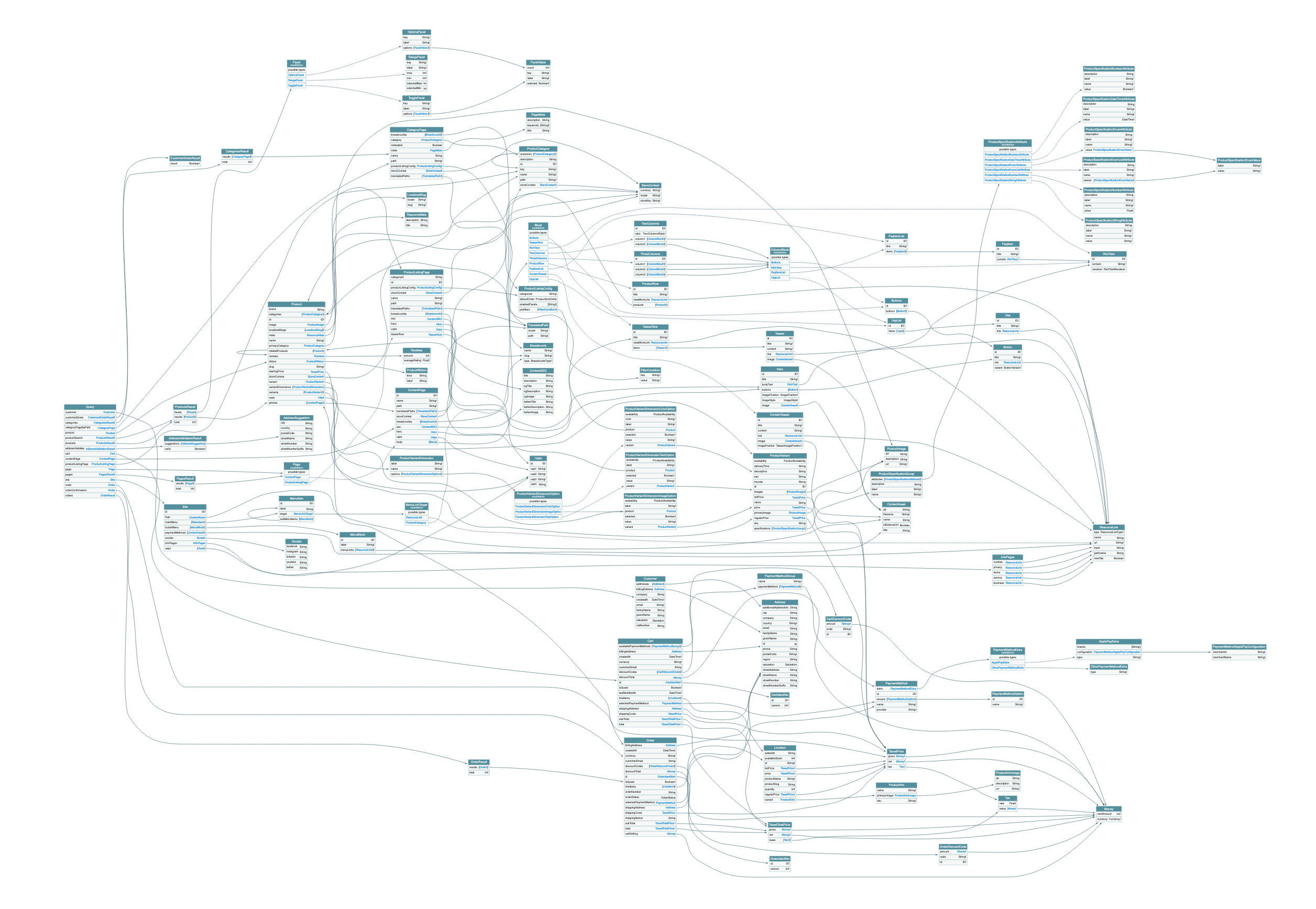
Shared types
Section titled “Shared types”Several types are shared across services using the @shareable
federation directive. This means multiple services can resolve the
same type independently:
Money: represents a monetary value withcentAmountandcurrencyCodeAddress: postal address used by checkout, account, and order servicesPageMeta: SEO metadata (title, description, open graph) used by CMS and catalog servicesBreadcrumb: navigation breadcrumbs resolved by both CMS and catalog
See page model for details on how page-related types work across services.
Extending the data model
Section titled “Extending the data model”Evolve’s data model is a foundation, not a ceiling. Because the architecture uses GraphQL Federation, you can extend it in several ways:
- Add fields to existing types: create a new subgraph that extends
an Evolve type with additional fields (e.g., adding a
loyaltyPointsfield toCustomer) - Add new types: introduce entirely new types and queries in a
custom subgraph (e.g., a
WishListorStoreLocatortype) - Override resolvers: replace how an existing field is resolved without changing the schema
# Example: extending Customer with loyalty points# in a custom subgraph
type Customer @extends @key(fields: "id") {  id: ID! @external  loyaltyPoints: Int!  loyaltyTier: LoyaltyTier!}
The gateway automatically merges your extensions into the supergraph. See customization and extensibility for detailed patterns and code examples.